PodTron9000: a free, native Kubernetes client for Mac
Switch clusters in a keystroke, follow a thousand logs live, and open a shell or a port forward from any pod. It starts read-only and asks before every change.
Download for Mac (Apple silicon) Try it in your browser
- macOS 13 or later
- Apple silicon
- Free
- No account
Read-only until you say so
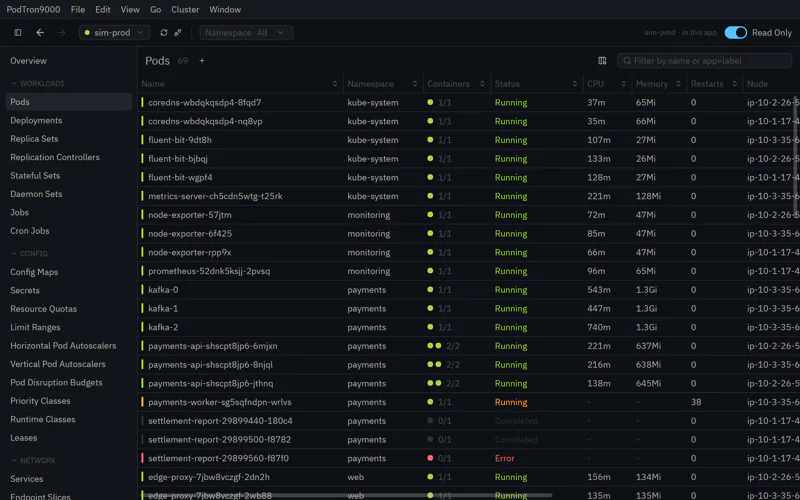
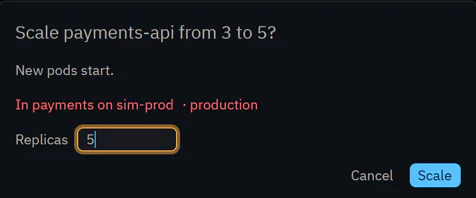
Read-only mode is on by default: look at anything, change nothing. Turn it off and every change still asks first. A YAML edit shows a diff before it’s applied, in red when it can’t be undone, and the warnings are sterner for a production context.
Deleting, restarting, scaling, cordoning and draining, cron jobs, a Helm rollback, editing or creating YAML: each one asks.
Clusters in a keystroke
⌘K lists the contexts in your kubeconfigs, most recent first. Type to narrow, Return to switch. Extra kubeconfigs and your Mac’s own certificate authorities are picked up too.
Logs, combined and live
Follow logs for a pod, a deployment, a service or a whole namespace. Levels from JSON, logfmt and klog, click one to hide it; a regex filter, pause, and the previous run. Over HTTP/2, a thousand followed logs share a few connections.
Shells and port forwarding
Open a shell in a container or on a node, or attach to a running container rather than only exec. Forward a port from a pod or a service to your Mac in a click.
The cluster at a glance
⌘0 shows the overview: nodes and the room left on them, pods by state, the pods in trouble, warnings, and 30-minute trends for CPU and memory.
Everything live
Workloads, config, networking, storage, nodes, events, custom resources and Helm releases, with no Helm needed. Anything unhealthy stands out, and YAML and events are a click away.
Signs in to EKS, GKE and more
PodTron9000 signs in through the same exec plugins kubectl uses:
aws eks get-token, gke-gcloud-auth-plugin and
kubelogin for OIDC.
Follow the links
Go from a pod to its workload and node, from a service to its pods, from a mount to its config map. Ownership trees run from a deployment to its replica sets, pods and containers.
Copy the command
Any row gives you the kubectl or helm command for it, with the context and namespace filled in, for a script or a teammate.
Containers, in full
State, last termination, image, requests and limits, probes, env and mounts, with secrets decoded. Who can do what, for any object. ⌘F filters rows by label selector, across all namespaces or several.
System requirements
macOS 13 Ventura or later, on a Mac with Apple silicon (M1 or later), and a kubeconfig for the clusters you want to reach. It does not run on Intel Macs.
Frequently asked questions
Is PodTron9000 really free?
Yes. There’s no trial, no license and no account.
Can it change my cluster by accident?
It starts in read-only mode. When you turn that off, every change asks first, and a YAML edit shows a diff before it’s applied.
Which clusters does it work with?
Any cluster your kubeconfig reaches, including EKS and GKE through their exec plugins, and OIDC sign-in through kubelogin.
Does it run on Intel Macs?
Not currently. PodTron9000 uses ARM NEON instructions, so it needs Apple silicon: an M1 chip or later. We may build for Windows, Linux and Intel Macs in the future if there is demand for it.
Can I try it without installing it?
Yes: open it in your browser, on simulated clusters. Your own clusters need the Mac app.
 Also from TON 618 Systems: PostTron9000
A native HTTP client for Mac, where every request is a curl file.