PostTron9000: a native HTTP client for Mac
An HTTP client where every request is a curl file you can diff, grep and run without the app. Native on Apple silicon, with no account and no cloud.
Download for Mac (Apple silicon) Try it in your browser
- macOS 13 or later
- Apple silicon
- 60-day free trial
- $60, one time
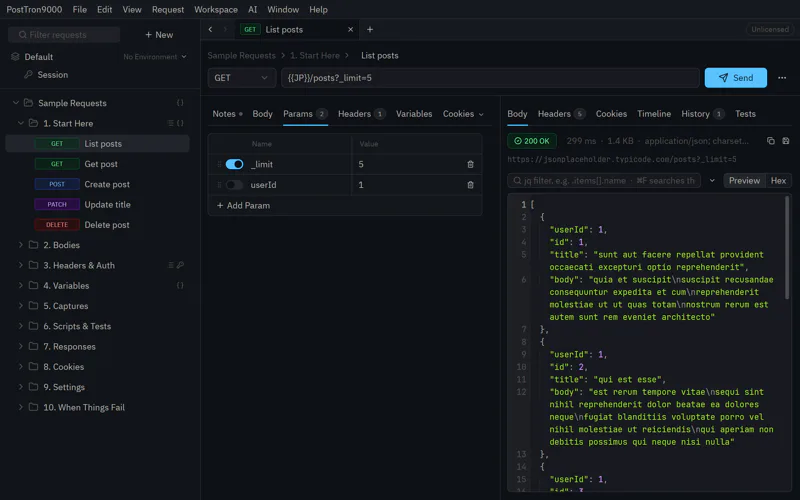
Every request is a plain curl file
PostTron9000 keeps each request as a curl config file, one per
request, in ordinary folders on your disk. There’s no database and no
export format. Diff them in git, grep them, or hand one to curl with
curl -K, no app needed.
Curl in, curl out: paste any curl command to make a request, and copy any request back out as one. The parsing is fuzzed against real bash and the Mac’s own curl, so what the app reads is what curl reads.
List posts.curl
url = "https://api.example.com/posts?_limit=5"
header = "Accept: application/json"
header = "Authorization: Bearer {{TOKEN}}"

# in a shell, without the app:
$ curl -K "List posts.curl"
Switching?
Import your collections, and your pm.* scripts still
run. Also import Insomnia, Bruno, Hoppscotch, Thunder Client, Yaak and
HTTPie, HAR and .http files.
Scripts and tests
Write scripts and tests in JavaScript, sandboxed in WebAssembly. Capture a token from one response for the next request, run a whole folder in order, and see what each step sent.
WebSocket, SSE and gRPC
PostTron9000 also supports WebSocket, server-sent events and gRPC, in the same workspace as the rest of your requests, with the same folders, variables and auth.
See where the time went
The history has a timeline for every send: DNS, TCP, TLS, send, wait and download, with the cipher, each redirect hop and the byte counts. The server’s certificate chain and its expiry are a click away. Responses have jq built in.
Environments and variables
Environments fill in {{VARIABLES}}, which can also
come from a file or the shell. Folders pass headers, auth, variables
and timeouts down to the requests in them, and each shows where it
came from.
Auth that renews itself
Basic, Bearer, API keys, Digest, NTLM, AWS SigV4 and OAuth 2.0 with PKCE, set once on a folder for everything in it. Expired tokens renew themselves.
Proxies, certificates and cookies
Per request or folder: a proxy (SOCKS5 too), a client certificate, a private CA and the HTTP version. A cookie jar for each environment.
Nothing hidden
Hover a row or a {{VAR}} to see exactly what it
sends and where that came from. Undo and redo work across the whole
workspace, and New From URL makes a request from a link.
No account, no cloud
Nothing to sign up for. Your requests, responses and history stay on your Mac, in files you can read. To share a workspace, use git, iCloud Drive or any shared folder: changes made there show up live.
PostTron9000 vs. Postman, Insomnia, Bruno and Yaak
PostTron9000 imports from each of them. Here is what’s different.
- Where requests live. PostTron9000 keeps each request as a curl config file that curl itself can run. The others keep collections in formats of their own.
- Accounts and sync. PostTron9000 has no account and no cloud. Share a workspace through git or any folder.
- Price. PostTron9000 is a one-time license, $60 for personal use. Postman and Insomnia sell subscriptions; Bruno and Yaak are open source with paid tiers.
- How it’s built. Postman, Insomnia and Bruno are Electron apps, and Yaak draws with a web view through Tauri. PostTron9000 is native code, for Apple silicon only.
- Scripts. Postman’s
pm.*scripts and Bruno’s scripts run in PostTron9000.
System requirements
macOS 13 Ventura or later, on a Mac with Apple silicon (M1 or later). It does not run on Intel Macs.
Frequently asked questions
Is there a free trial?
Yes: every feature works for 60 days. After that it needs a license, a single payment with no subscription, which covers the major version you buy and the next one. See pricing.
Do I need an account?
No. Your requests, responses and history stay on your Mac.
What can it import?
Postman, Insomnia, Bruno, Hoppscotch, Thunder Client, Yaak and HTTPie
collections, OpenAPI specs, HAR files, .http files and
curl commands.
Does it run on Intel Macs?
Not currently. PostTron9000 uses ARM NEON instructions, so it needs Apple silicon: an M1 chip or later. We may build for Windows, Linux and Intel Macs in the future if there is demand for it.
Can I try it without installing it?
Yes: open it in your browser. It’s PostTron9000 built for WebAssembly, so it has a browser’s limits: it can only reach APIs that allow requests from a web page (CORS), and your files stay in that browser. The Mac app has neither limit.
 Also from TON 618 Systems: PodTron9000
A free, native Kubernetes client for Mac.